
Before you commit to a full Report, the Map gives you a fast, visual gut-check on any site's viability. You can spot red flags early, so you only spend time on the sites worth a closer look.
Viewing Map Layers
The Map provides hundreds of layers to help you identify features within your area of interest. Check the box next to a layer to activate it, select the heart to add it to your Favorites group, or click the dropdown arrow to view the legend, labels, and source information.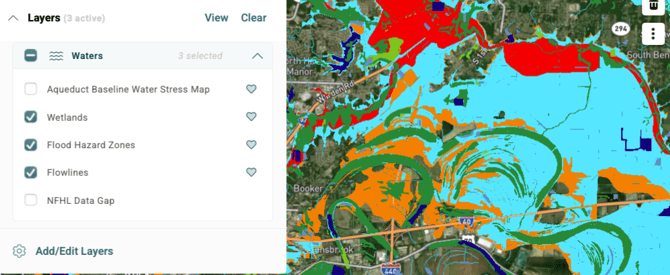
You can click Add/Edit Layers to view all layers and tailor your existing list. Admins can also upload custom data layers for visualization.
Recommended Layers for Site Screening
Start your screening with these Transect layers. Together they give you a parcel-level view of ownership, risk, zoning, outreach status, and buildable area.
- Parcels: View parcel boundaries and ownership details directly on the Map, giving you a clear picture of property lines within your area of interest (AOI).

Within the Parcels layer, you can also enable:
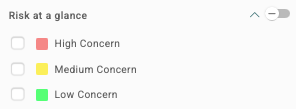
- Risk at a Glance: A color-coded risk heatmap (red, yellow, green).
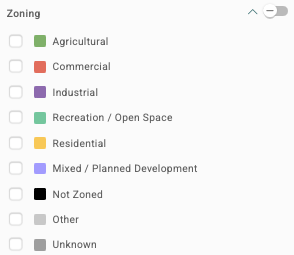
- Zoning: Land-use/zoning designations by parcel (availability varies by county).
-
- Site Control Status: Color-codes parcels by landowner outreach status (such as Contacted, In Discussions, or Acquired), so your team can track land acquisition in one place.
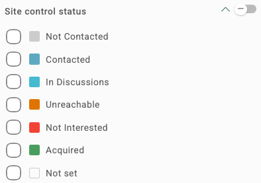
- Site Control Status: Color-codes parcels by landowner outreach status (such as Contacted, In Discussions, or Acquired), so your team can track land acquisition in one place.
- Buildable Area: Identifies developable land by filtering out areas with slope, wetlands, and other undesirable features. Toggle it on in the Map, or click Edit Criteria to customize your selections.

Cross-Reference Site Constraints
Next, layer on environmental, regulatory, and infrastructure data to spot constraints that could affect your site:
- Waters: Water features including Wetlands, Flowlines, and Flood Hazard Areas.
- Protected Areas and Cultural Resources: Historical Landmarks/Monuments, Tribal Areas, and Cemeteries.
- Species: Critical Habitat for Threatened & Endangered Species, Species Risk Map, and more.
- Physical/Geotechnical: Slope Map, Soil Map (Bedrock Depth – Minimum), and Karst in the United States.
- Infrastructure: Electric Power Transmission Lines (HIFLD), Electric Substations (HIFLD), and Natural Gas Interstate and Intrastate Pipelines.
- Geography and Transportation: Cities & Towns, County Boundaries, U.S. Roads, U.S. Rails, and USA Airport Areas.
- Pulse: Active moratoriums, existing projects, and a color-coded heatmap of community sentiment to spot local opposition.
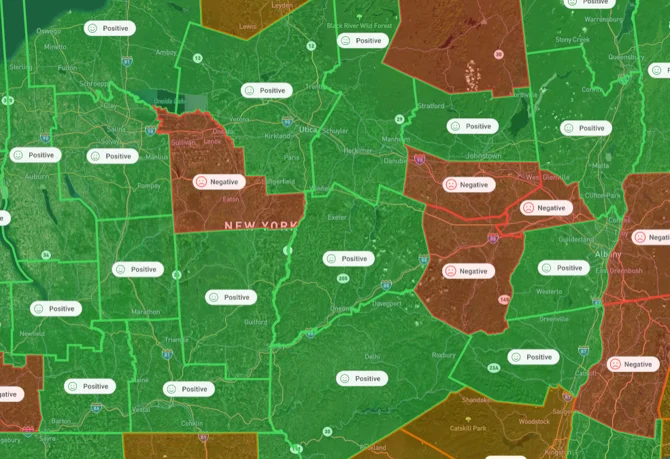
- Your Own Data: Admins can upload custom data layers to visualize your own data in both the Map and Reports.
Searching for a Project site? Use the Parcel Filter or Smart Sites to locate an area of interest that meets your buildable area requirements.
Cross-Reference Premium Datasets
Add-on data packages give you more detail on grid and infrastructure access, so you can rule sites in or out sooner. Depending on your plan, you may also see:
- Interconnection: Injection and withdrawal capacity estimates.
- Distribution Lines: Distribution line locations and, where available, hosting capacity.
- Data Center: Locations of fiber optic lines and existing and planned data centers.
For more information on pricing, please contact your Customer Success Manager.
Next Steps & Support
What's Next?
This guide is part of a four-part series on finding and assessing sites in Transect. Continue to the next guide, or jump to any step as your Project moves forward:
Need More Support?
- Support team: Questions about the platform? Use the in-app chat or email support@transect.com
- Environmental Team: Questions about environmental constraints or permitting considerations for your project? Schedule a consultation with our Regional Environmental Specialists.