
Flooding is one of the most common — and costly — risks a project can face, so knowing what type of flood zone you're dealing with matters early in the site-selection process. This article breaks down the different flood zone types and shows how Transect visualizes this data so developers can quickly assess risk and make informed decisions about project locations.
In this article, we’ll review:
Types of Flood Hazard Areas
FEMA maps flood risk using a set of standardized zone designations. Here's what each one means:
- Special Flood Hazard Area (SFHA): The base floodplain displayed on FEMA maps, inclusive of A and V zones.
- Zone A: The Special Flood Hazard Area (except coastal V Zones) shown on a community's Flood Insurance Rate Map.
- Zone A: SFHA, where no base flood elevation is provided.
- Zone A#: Numbered A Zones (e.g., A7 or A14), SFHA, where the FIRM shows a base flood elevation in relation to NGVD.
- Zone AE: SFHA, where base flood elevations are provided. AE Zone delineations are now used on new FIRMs instead of A# Zones.
- Zone AO: SFHA with sheet flow, ponding, or shallow flooding. Base flood depths (feet above grade) are provided.
- Zone AH: Shallow flooding SFHA. Base flood elevations in relation to NGVD are provided.
- Zone B: Area of moderate flood hazard, usually depicted on Flood Insurance Rate Maps as between the limits of the base and 500-year floods. B Zones are also used to designate base floodplains of little hazard, such as those with average depths of less than 1 foot.
- Zone C: Area of minimal flood hazard, usually depicted on Flood Insurance Rate Maps as above the 500-year flood level. B and C Zones may have flooding that does not meet the criteria to be mapped as a Special Flood Hazard Area, especially ponding and local drainage problems.
- Zone D: The Zone D designation is used for areas where there are possible but undetermined flood hazards, as no analysis of flood hazards has been conducted.
- Zone V: The Special Flood Hazard Area subject to coastal high hazard flooding. There are three types of V Zones: V, V#, and VE, and they correspond to the A Zone designations.
- Zone X (shaded): Area of moderate flood hazard, including the 0.2% annual chance (500-year) floodplain, areas protected by levees from the 1% flood, or shallow flooding zones. This designation on newer FIRMs typically replaces Zone B.
- Zone X (unshaded): Area of minimal flood hazard, located outside both the Special Flood Hazard Area and the 500-year floodplain, considered to have the lowest risk of mapped flooding. This designation on newer FIRMs typically replaces Zone C.
Flood Hazard Zones in the Map
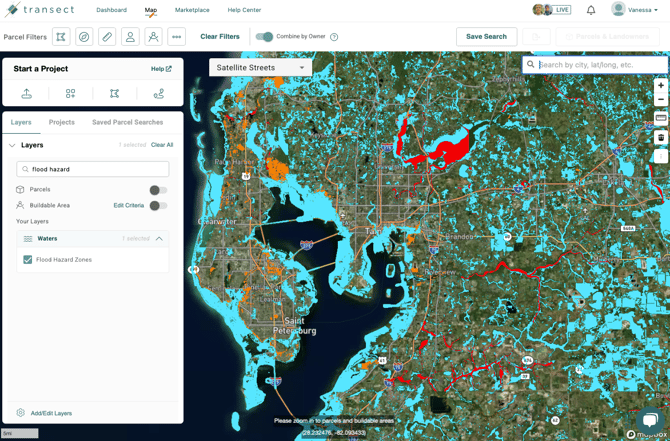
Within the Map, the Flood Hazard Zones layer visualizes areas that contain regulatory flood zones designated by FEMA. Right-click on any map feature to see more information about it.
Flood Hazard Zones in Reports
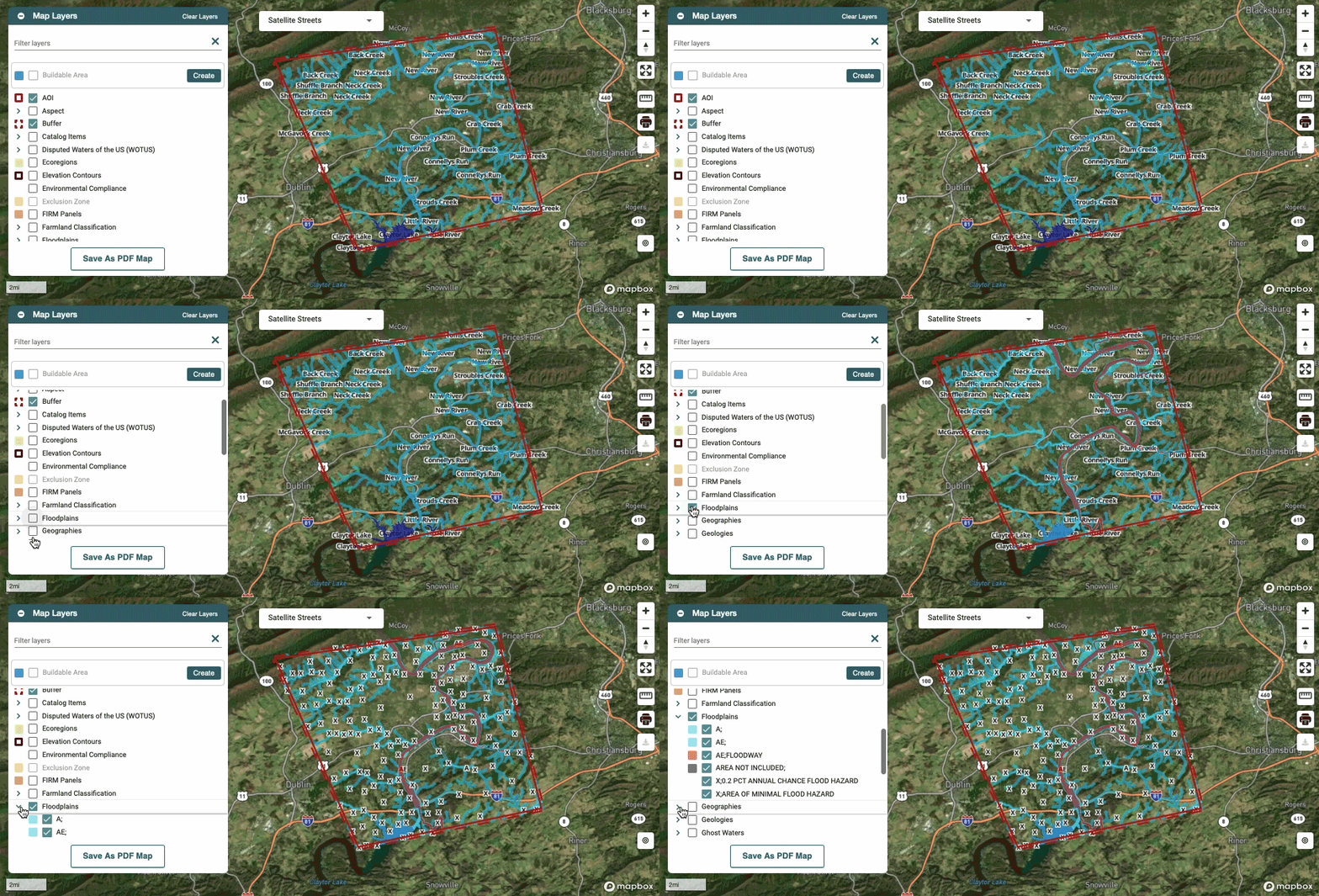
After running a report, you can visualize flood hazard zones in the Report Map by checking the box to activate the Floodplains layer. This shows which zones were found within your area of interest and exactly where they fall.
The Executive Summary provides an overview of the Waters found within the AOI, broken down into wetlands, waterways, and floodplains. Click Learn More on any of these for additional detail.
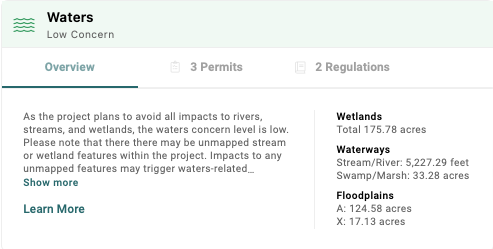
You'll see a concern level assigned based on the following criteria:
- High Concern: The concern level will be high if the project area intersects any wetland areas, waterbody areas, or streams, or if it was indicated that waters will be impacted from the context questions.*
- Moderate Concern: The concern level will be moderate if there are no NWI wetlands or NHD streams within the project area, but it falls within a FEMA 100-year floodplain.
- Low Concern: The concern level will be low if the project area does not intersect or contain wetland areas, streams, or waterbody areas, or if it was indicated that waters will not be impacted from the context questions.*
*As defined by the report creator during the context questions in the report creation process. Learn more about how these are calculated in our Concern Levels article.
For a closer look at the underlying data, head to Environmental > Waters > Data. This page breaks down the water sources located within your area of interest — including wetlands, waterways, flood hazard areas, and FIRM panels — and shows the type, sub-type, area, and whether each feature falls within the buffer or the AOI. You can export this information at any time by right-clicking in the table and selecting Export.
